AI card scanning
Pull name, email, phone, company, and title from any card.
Snap a photo. AI extracts the contact. It lands in your CRM. Follow-up starts automatically.
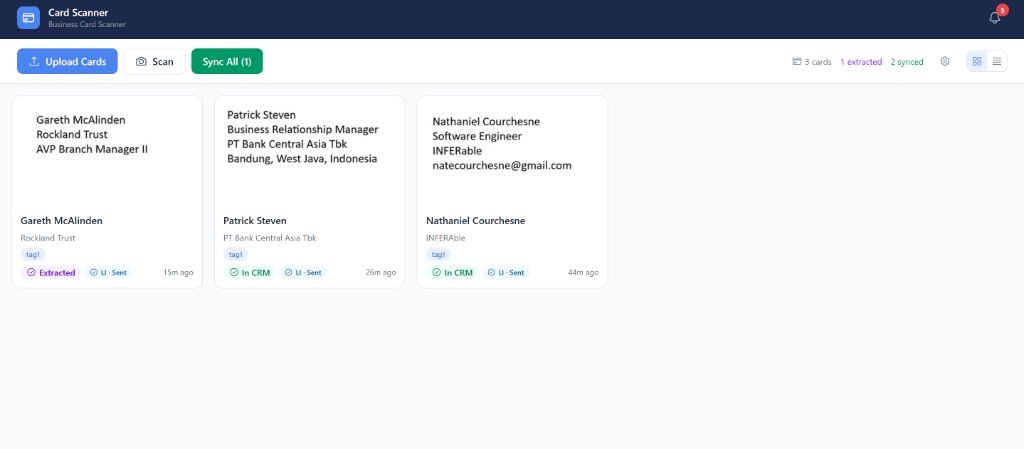
You collected 40 business cards at your last event. How many made it into your CRM? This app fixes that.
Four steps. No data entry. No leads lost.
Launch After Networking from your CRM sidebar.
Take a photo or upload card images — single or bulk.
The contact lands in your CRM with tags and custom fields mapped.
Your GoHighLevel workflow kicks off — email, SMS, and tasks — automatically.
Automations run inside GoHighLevel — not in After Networking
When you sync a card, GoHighLevel creates or updates the contact. Follow-up email, SMS, and tasks don't fire from this app — you build workflows in GoHighLevel instead (common triggers: Contact created, or a tag your scans apply). Once the trigger fires, your sequence runs automatically.
Read the full workflows guide — triggers, tag filters, expo-by-expo examples, GHL troubleshooting, and official docs.
Pull name, email, phone, company, and title from any card.
Scan the same card twice — we merge it, no problem.
Drop 50 cards at once after an event and walk away.
Every scan saved for reference — searchable later.
Send any value to any CRM field your team already uses.
Scan in the field, manage from your laptop. Same data, same place.
Send connection requests to fresh contacts without leaving the app.
Stop typing. Start following up. Get every lead from your next event into your CRM the moment you scan it.
Open the app